
From the notebook
Forwarders, Conditional Forwarders, and Stub Zones in Windows DNS: What Each One Is, How They Differ, and How To Pick the Right One
Three different mechanisms in Windows DNS that all route queries to another DNS server, all sound similar, and all solve different problems. Standard forwarders are the catch-all for everything the server doesn't own. Conditional forwarders route specific domains to specific upstreams. Stub zones cache the authoritative nameserver list for an external zone. Picking the wrong one produces silent resolution failures. Here's the decision tree for someone seeing these terms for the first time.
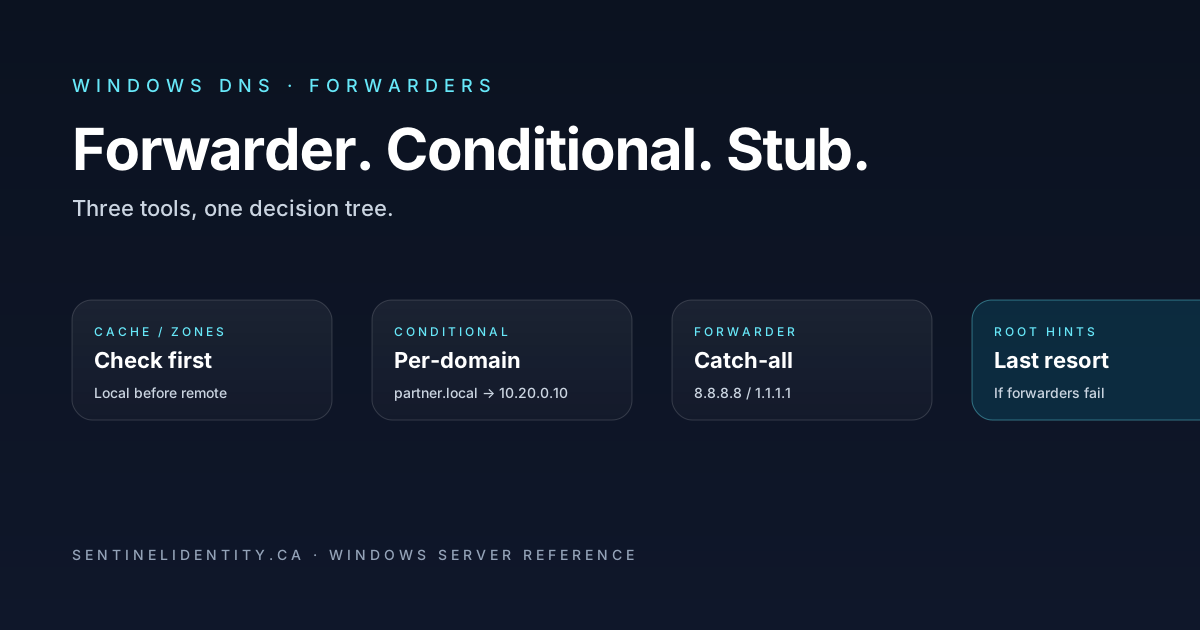
A new partner organisation gets added to an Active Directory forest trust and suddenly nobody on the corporate network can resolve names in the partner's domain. The trust itself is fine; Kerberos authentication works across the trust; the firewall lets the traffic through; but DNS queries for anything ending in partner.local keep returning "name not found." The reason, almost every time, is that nobody configured the right kind of forwarder for the partner zone on the DNS servers. Windows DNS has three different mechanisms for routing queries to another DNS server, and picking the wrong one is exactly how this kind of mystery happens.
This article is about those three mechanisms — standard forwarders, conditional forwarders, and stub zones. They all exist on every Windows DNS server, they all sound similar, and they all solve a different problem. A standard forwarder is the catch-all: "for anything I don't already have an answer for, ask this upstream server." A conditional forwarder is scoped: "for this specific domain, ask this specific upstream." A stub zone is yet a third thing: "I'm going to track who's authoritative for this external zone, and forward queries directly to them." Each is right for a different situation, and the consequences of picking the wrong one range from "doesn't work" to "works but routes through the wrong server" to "looks like it works but silently sends queries through the public internet."
For someone seeing these terms for the first time, the decision tree is small and worth internalising once. After that, the answer for any future "we need to forward DNS queries to that server" question takes about fifteen seconds. This piece walks through what each mechanism actually does, the order Windows DNS consults them when a query arrives, three real scenarios where you'd pick each, the PowerShell configuration that doesn't require clicking through DNS Manager, and the common misconfigurations that produce exactly the kind of opaque-failure ticket described above.
Where forwarders fit in the resolution path
When a Windows DNS Server receives a query, it walks a specific sequence to find an answer. Understanding this sequence is the prerequisite for picking the right forwarder type.
- Local cache. If the answer is still cached and within TTL, return it. No upstream call.
- Authoritative zones. If a primary, secondary, AD-integrated, or stub zone on this server matches the query, answer from that zone.
- Conditional forwarders. If a conditional forwarder is configured for the query's domain (or a parent of it), forward to the specified upstream server.
- Standard forwarders. If standard forwarders are configured and no conditional forwarder applied, forward to one of them.
- Root hints / recursion. If recursion is enabled and no forwarder produced an answer (and the forwarder's "Use root hints if no forwarders are available" option is set), walk the root chain.
- SERVFAIL. If none of the above produces an answer, return SERVFAIL.
The implications of this order matter a lot.
Conditional forwarders are consulted before standard forwarders. A conditional forwarder for partner.local wins over what a standard forwarder for everything else would do. This is what makes the decision-tree approach to forwarder configuration clean — specific routes always beat general routes.
Stub zones are checked at step 2, not step 3. A stub zone for partner.local is consulted before any conditional forwarder for the same domain. From the resolution path's perspective, a stub zone is an authoritative-style zone (the server holds information about it, even if the actual records live elsewhere), so it gets evaluated at the same point as primary and AD-integrated zones.
A cache hit short-circuits everything below. Once an answer is cached and still within TTL, none of the forwarder logic runs. This is what makes DNS feel fast — most queries hit cache and never touch any upstream.
The four other articles in this series cover what happens at steps 1, 2, 5, and 6 in detail. This article is about steps 2 (stub zones specifically) and 3 (conditional forwarders) and 4 (standard forwarders).
Vocabulary for the three mechanisms
Three terms that define the rest of the article. Worth pinning down before going further because they're the source of most of the confusion.
Standard forwarder. An upstream DNS server that the local server consults for any query it can't answer from its own zones (and that no more-specific conditional forwarder handled). The forwarder is configured server-wide, not per-zone, and applies to every query that falls through to step 4 of the resolution path. Typical use: pointing internal resolvers at an upstream resolver (your ISP's DNS, a security-vendor DNS, Cloudflare's 1.1.1.1) to handle anything outside your authoritative zones.
Conditional forwarder. Exactly like a standard forwarder, except scoped to a specific domain name. A conditional forwarder for partner.local says "any query whose name ends in partner.local (or matches partner.local exactly) goes to these specific upstream servers, and only those queries." Per-domain. Used for per-organisation routing.
Stub zone. A lightweight zone that contains only the NS records and corresponding glue A/AAAA records for an external zone. The local server holds the NS list for the external zone, queries the listed authoritative servers iteratively (not recursively) when a client asks for a name in that zone, and returns the answer. Differs from a conditional forwarder in two key ways: stub zones auto-refresh their NS list from the master servers, and stub zones expect iterative responses from the upstream rather than recursive responses.
The distinction between "iterative" and "recursive" upstream behavior is where stub zones and conditional forwarders genuinely differ in behavior. A conditional forwarder asks the upstream "please resolve this for me" and expects the upstream to do the work and return the final answer. A stub zone asks the upstream "please tell me what you know about this, including referrals if you don't have the answer" and is willing to follow referrals itself. Most DNS servers configured as enterprise resolvers will perform either pattern; some authoritative-only servers refuse recursive queries from outside parties, in which case only the stub zone pattern works against them.
Three scenarios where each is the right choice
Concrete situations to make the abstract distinctions land.
Scenario one — standard forwarder. Your internal DNS servers are the resolvers your clients point at. You want all queries for internet names (anything you're not authoritative for and don't have specific routing for) to go through a security-filtering DNS service rather than walking the root chain directly. You configure standard forwarders pointing at the filtering service's IPs. Any query that doesn't match your authoritative zones or any conditional forwarder ends up going through the filtering service. This is the "default route" for DNS, and standard forwarders are the right tool because the routing is broad and uniform.
Scenario two — conditional forwarder. Your AD forest has a one-way trust with a partner's forest at partner.local. Users in your forest need to be able to resolve names like app01.partner.local. You don't host any of the partner's DNS records, so you can't add an authoritative zone. The partner's DNS resolvers (at 10.20.0.10 and 10.20.0.11) are willing to recurse for queries from your network. You configure a conditional forwarder for partner.local pointing at those servers. Queries for partner names go directly there; queries for everything else continue to follow your normal forwarding setup.
Scenario three — stub zone. Same partner scenario, but their authoritative DNS servers don't allow recursion from outside their network. They'll only respond authoritatively for queries for their own zones — no recursive resolution on your behalf. A standard or conditional forwarder pointing at them would fail because the forwarder model expects the upstream to do recursion. Instead, you create a stub zone for partner.local on your DNS server. The stub zone holds the NS records for partner.local (so your server knows which of their authoritative servers to ask), refreshes that list periodically (so changes in their authoritative server topology propagate to you automatically), and queries them iteratively for actual record lookups. Resolution works because the upstream is being asked the right kind of question.
The pattern across the three: standard forwarders for broad routing of everything you don't otherwise handle, conditional forwarders for per-domain routing through resolvers willing to recurse for you, stub zones for per-domain routing to authoritative servers that aren't willing to recurse.
The decision tree
The four-step question sequence for picking the right tool when a new external domain needs to be reachable from your DNS.
Step one: Do you operate that domain's authoritative DNS yourself? If yes, the domain is just another zone on your DNS servers. Use an AD-integrated primary zone (the forward-lookup-zones article covers that). None of the forwarding mechanisms apply.
Step two: Does the external domain have authoritative DNS servers you can reach directly, and you want to keep the NS list current automatically? If yes, use a stub zone. The stub auto-discovers the upstream's NS records and queries them iteratively. Most robust when the upstream's DNS topology might change over time.
Step three: Is the external resolution served by a resolver (not necessarily authoritative for the zone) that's willing to recurse on your behalf? If yes, use a conditional forwarder pointing at that resolver. Simpler than a stub zone, no auto-discovery needed.
Step four: None of the above, but you have an upstream "default" DNS that should answer everything else. Use a standard forwarder. This is the only mechanism that makes sense for "anything I don't specifically know about."
Most enterprise resolvers end up with the layered configuration: AD-integrated zones for internal domains, a handful of stub zones or conditional forwarders for partner / acquired / cloud-hosted domains, and one or two standard forwarders as the default route for internet resolution.
Configuring a standard forwarder
Standard forwarders are server-level settings, configured once per DNS server. The PowerShell:
# Configure two standard forwarders, with a 3-second timeout each
Set-DnsServerForwarder -IPAddress "1.1.1.1", "8.8.8.8" -Timeout 3
The forwarders are tried in the order specified. If the first one fails or times out, the server moves to the second. If all standard forwarders fail and the "Use root hints if no forwarders are available" option is on (the default), the server falls back to root-hints recursion. Turn that fallback off if you don't want any leakage:
Set-DnsServerForwarder -UseRootHint $falseStandard forwarders are not stored in Active Directory — they're a per-server setting. To configure them across the forest consistently, you script the same Set-DnsServerForwarder call against every DC running the DNS role, or you use Group Policy / DSC / Ansible / your configuration management of choice.
Configuring a conditional forwarder
Conditional forwarders, unlike standard forwarders, can be stored in Active Directory so they replicate across DCs running DNS. This is the model worth using because otherwise you end up maintaining the same conditional forwarder configuration on every server manually.
Add-DnsServerConditionalForwarderZone `
    -Name "partner.local" `
    -MasterServers "10.20.0.10", "10.20.0.11" `
    -ReplicationScope "Forest"
The -ReplicationScope parameter is the dial that decides whether the configuration replicates. Forest means every DC running DNS in the forest gets the same conditional forwarder configuration. Domain scopes it to the current domain only. Without the parameter the conditional forwarder is per-server.
Inspect existing conditional forwarders (they show up in the zone list as zones with type Forwarder):
Get-DnsServerZone | Where-Object ZoneType -eq "Forwarder"Configuring a stub zone
Same syntax as a conditional forwarder, just a different zone type:
Add-DnsServerStubZone `
    -Name "partner.local" `
    -MasterServers "10.20.0.10", "10.20.0.11" `
    -ReplicationScope "Forest"
The masters list you provide here is the initial set of authoritative servers for the external zone. The stub zone uses these to fetch the current NS record list for the zone and then queries the discovered NS servers for actual record lookups. If the partner reorganises their DNS topology and the authoritative servers move to new IPs, the stub zone learns the new IPs at the next refresh (default every hour or so, configurable).
Stub zones show up in the zone list as zones with type Stub:
Get-DnsServerZone | Where-Object ZoneType -eq "Stub"Operating forwarders in production
A few operational practices that pay off.
Audit periodically. A weekly check that every DC running DNS has the same forwarder configuration. Configuration drift is the most common source of "DNS works from this client but not from that one" tickets — the two clients are pointed at different DCs, and those DCs have different forwarder configurations.
$dcs = Get-ADDomainController -Filter * | Select-Object -ExpandProperty Hostname

foreach ($dc in $dcs) {
    $std  = (Get-DnsServerForwarder -ComputerName $dc).IPAddress
    $cond = (Get-DnsServerZone -ComputerName $dc | Where-Object ZoneType -eq "Forwarder").ZoneName
    $stub = (Get-DnsServerZone -ComputerName $dc | Where-Object ZoneType -eq "Stub").ZoneName
    [pscustomobject]@{
        Server      = $dc
        Standard    = $std -join ", "
        Conditional = $cond -join ", "
        Stub        = $stub -join ", "
    }
}
The output should look identical across every DC. Anything that doesn't is drift.
Test resolution against specific servers. When you've added or changed a forwarder, verify it actually works by querying the specific server directly:
Resolve-DnsName -Name "dc01.partner.local" -Server "your-dns-server" -DnsOnly-DnsOnly skips local cache and goes straight to the named server. Useful for confirming a fresh configuration without restarting any services.
Tune timeouts for known-slow paths. Default forwarder timeout is 3 seconds. For cross-WAN forwarders or partners with high latency, 3 seconds is sometimes not enough and queries fail intermittently. Bump to 5–10 seconds for those specific routes.
What goes wrong — the common misconfigurations
Conditional forwarder pointing at a server that doesn't recurse. The upstream returns a referral instead of the answer; the local server doesn't follow the referral and just returns whatever the upstream sent. End result: client gets a useless response. Fix: switch to a stub zone, which expects the iterative behaviour and follows referrals itself.
Standard forwarder configured for the partner domain. All traffic goes through the standard forwarder, which has no idea about partner.local. Resolution fails for partner names. Fix: use a conditional forwarder or stub zone specifically for the partner domain.
Conditional forwarder for a zone you're already authoritative for. Confuses the resolution order — the server tries to forward queries for its own zone to an upstream. Usually a leftover from a misconfigured setup. Fix: delete the conditional forwarder. Authoritative zones take precedence anyway, so the conditional forwarder is just dead configuration.
Stub zone with stale master servers. The original master IPs you configured no longer respond, the stub can't refresh its NS list, and resolution fails after the cached NS data expires. Fix: update the master server IPs.
Forwarder configured server-by-server instead of AD-integrated. Initial configuration was done on one DC, additional DCs were added later, the forwarder configuration was never copied. Some clients get the conditional forwarder (when their resolution hits the original DC) and some don't (when they hit a different DC). Fix: re-create conditional forwarders and stub zones with -ReplicationScope Forest so they propagate via AD.
Things people ask
Is there a performance difference between a conditional forwarder and a stub zone for the same domain? In normal operation, no meaningful difference. Stub zones add a small amount of metadata maintenance (periodic refresh of NS records) but query latency is comparable.
Can I have both a conditional forwarder and a stub zone for the same domain? No. Each domain name can have one zone on a server (and a stub zone counts as a zone). Adding a conditional forwarder for a domain that already has a stub zone produces an error.
Do conditional forwarders work across forest trusts automatically? No. The forest trust enables AD authentication; DNS is a separate service. You explicitly configure conditional forwarders (or stub zones) for the trusted forest's domains on your DNS servers as part of the trust setup.
If a forwarder fails, will the server keep trying it? Yes — Windows DNS retries failed forwarders. If you have multiple forwarders configured and the first one is consistently slow or unresponsive, the server tracks that and may temporarily deprioritise it, but the configured order remains the strong preference.
What's the difference between a "forwarder" in the General tab and the Forwarders tab in DNS Manager? The Forwarders tab manages server-level standard forwarders. The "Forwarder" zone type (visible as a zone in the zone list) is a conditional forwarder. Two different concepts, slightly confusing GUI naming.
Do stub zones use zone transfers like secondary zones do? No. Stub zones do not pull the full record set from the master — they pull only the NS records. The actual record lookups happen at query time by iteratively querying the discovered NS servers. This is what makes stub zones lightweight compared to secondary zones.
Can I forward queries via DNS over TLS or DNS over HTTPS? Windows DNS Server supports DNS over HTTPS for forwarders in recent versions, via the Add-DnsServerForwarder cmdlet's transport parameters. DoT is less well-supported. Both are worth considering for forwarders pointing at upstream public DNS to keep the queries encrypted in transit.
Where to read further
About the author
MU.AMicrosoft 365 / Entra Engineer
MU.A is the editorial byline for Sentinel Identity, covering Microsoft Entra, Microsoft 365, and identity administration. Send corrections or questions through the contact page.
Feedback
Was this article helpful?
Anonymous — no account or comment required.
Related reading
Microsoft Entra Domain Services SAM Account Name Sync
Pilot Microsoft Entra Domain Services SAM account name sync safely: verify Active Directory source names, test legacy authentication, and monitor convergence.
Microsoft Entra AD Group Enforcement: Safe Pilot Guide
Pilot Microsoft Entra AD group enforcement safely: prepare every writable domain controller, audit blocked writes, test Cloud Sync, and plan rollback.
Microsoft Entra Domainless SAML Federation: Admin Guide
Deploy Microsoft Entra domainless SAML federation safely for B2B guests: validate issuer routing, redemption order, claims, certificates, logs, and rollback.