
From the notebook
Manage Microsoft Entra Recommendations with Microsoft Graph
Manage Microsoft Entra recommendations with Graph beta: inventory resources, add workflow tags, choose accurate states, and preserve review evidence.
To manage Microsoft Entra recommendations at scale, start with a read-only Microsoft Graph inventory, expand each recommendation into its impacted resources, and preserve that baseline outside the service. Then use the new beta workflow controls deliberately: apply free-form tags for operational grouping, mark work as planned only after it has an owner and change record, use alternateMitigation only when a compensating control is documented, and use riskAccepted only after the appropriate risk owner approves the exception.
That is the short answer. Microsoft added recommendation tags, alternate remediation states, a needsMoreAction status, a critical priority, NIST Cybersecurity Framework 2.0 mappings, and new lifecycle timestamps to Microsoft Graph beta in September 2026. These additions make the recommendations API much more useful as an operations queue, but they do not remediate a tenant, assign a ticket, collect an approval reason, or turn a preview API into a supported production dependency.
Grab a coffee before connecting this to a workflow engine. The valuable design is not “automate every recommendation.” It is read broadly, decide narrowly, write with evidence, and verify independently.
Manage Microsoft Entra recommendations at the right layer
Microsoft Entra recommendations are tenant-specific findings generated from Microsoft's predefined conditions. The service evaluates the tenant daily. Microsoft's recommendations overview says a recommendation appears when the daily analysis determines that it applies, and that data normally reflects the preceding 24 hours but can occasionally take up to 72 hours to synchronize.
A recommendation has two operational layers:
- the recommendation describes a tenant-level improvement action, its priority, benefit, action steps, lifecycle status, and any score information; and
- an impacted resource represents a user, application, service principal, or other directory object associated with that recommendation.
Some recommendations are tenant-level and have no impacted-resource collection. Others can contain a long list of individual objects. The Microsoft Entra admin center displays at most 50 impacted resources for a recommendation; Microsoft's recommendation operating guide directs administrators to Microsoft Graph when they need the full list.
That object model matters. Marking one application as planned is different from changing the status of the recommendation that contains every affected application. Keep the resource-level action when ownership, mitigation, or timing differs across objects.
Follow the settings in the admin center
These are real product screenshots published by Microsoft, not generated UI or captures from this site’s tenant. Portal labels can change. Use a read-capable role for inspection and obtain the required update role only if you are authorized to change the state.
1. Open the recommendation list
In the Microsoft Entra admin center, go to Entra ID → Overview → Recommendations. Select a recommendation relevant to your task. The screenshot uses Microsoft’s Contoso demonstration data; your names and counts will differ.
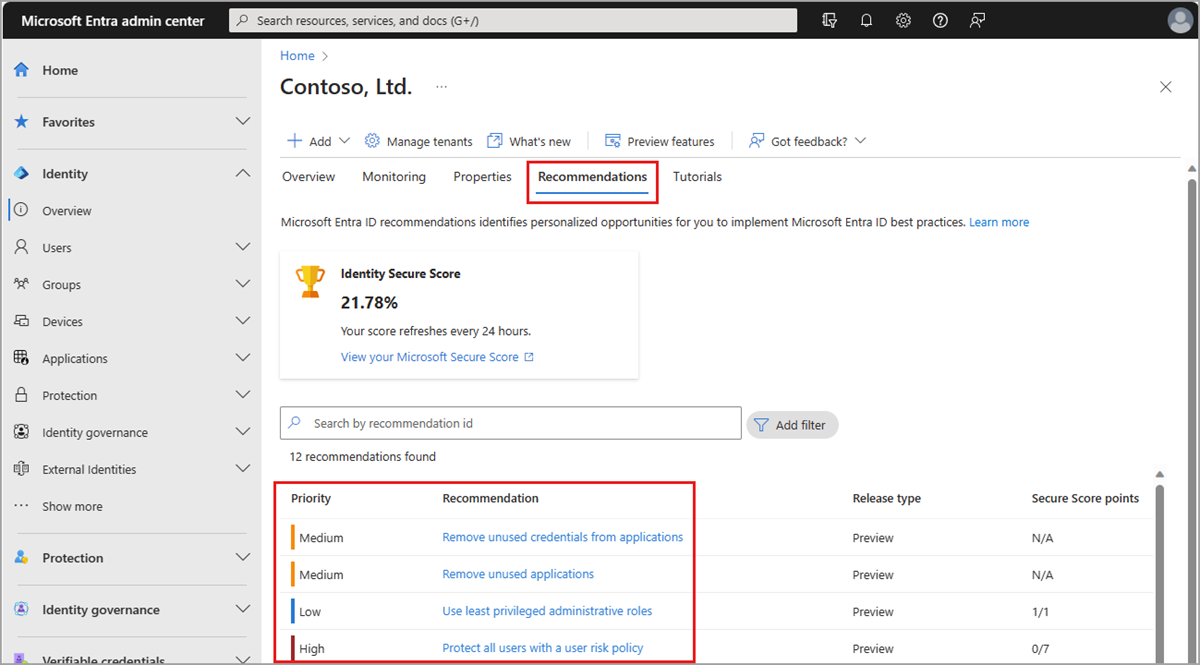
Microsoft documentation screenshot. Source and current instructions · Open full size.
2. Read the selected recommendation
Review the status, priority, and impacted resource type before deciding who should investigate. These describe the recommendation, not proof that a configuration change has been made.

Microsoft documentation screenshot. Source and current instructions · Open full size.
3. Inspect the affected resource
Use More details beside the relevant impacted resource. Match the object to your inventory and review the recommended action before making a change.
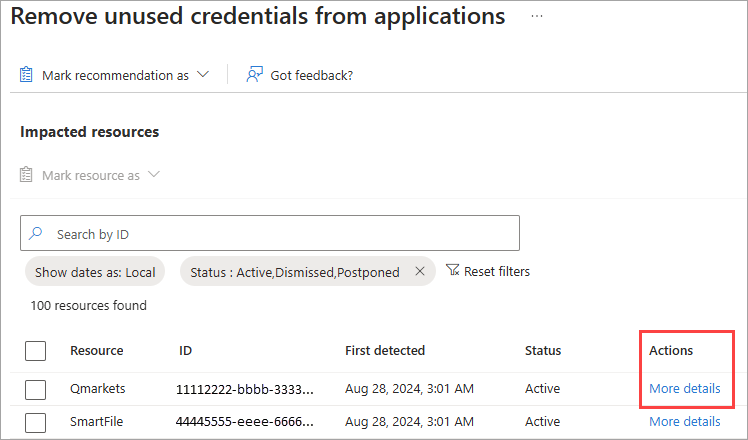
Microsoft documentation screenshot. Source and current instructions · Open full size.
4. Choose the correct scope for a status change
The recommendation-level Mark as menu applies to the recommendation. A resource-level action is separate. Choose a state only after recording the rationale and owner; a workflow-state update does not remediate the underlying configuration. This screenshot shows the published portal menu, not the newer Graph beta status actions described below.
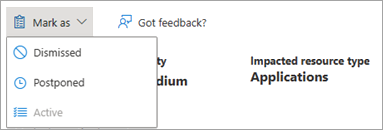
Microsoft documentation screenshot. Source and current instructions · Open full size.
What changed in the September 2026 Graph preview
Microsoft's September 2026 Microsoft Graph update added the following recommendation capabilities to the beta endpoint:
- user-defined tags on recommendations and impacted resources;
- batch tag add and remove actions for up to 50 impacted resources per request;
planned,riskAccepted, andalternateMitigationstatus actions;needsMoreActionfor impacted resources andneedsMoreActionResourceCounton the parent recommendation;criticalas a recommendation priority;nistClassificationsfor NIST Cybersecurity Framework 2.0 function and category mappings;- lifecycle fields including completion, remediation, failed-review, and status-modified timestamps; and
lastRefreshedDateTimeon the recommendation configuration.
Microsoft labels this surface preview and warns that beta APIs can change without notice and are not supported for production applications. No general-availability date, default-on rollout, or mandatory automation requirement has been announced. Use it in a controlled operator workflow, revalidate the schema before each rollout ring, and keep the source ticket or governance record outside the beta API.
The individual method references currently show availability in the global service, US Government L4, US Government L5, and China operated by 21Vianet. Preview availability is still not a substitute for testing the endpoint, permissions, and returned schema in each target tenant.
Build the inventory before changing a status
Use a separate read identity for discovery. Microsoft documents DirectoryRecommendations.Read.All as the least-privileged Graph permission for listing recommendations and impacted resources. For delegated reads, supported built-in roles include Reports Reader, Security Reader, and Global Reader, as well as several roles that also support updates. The current list recommendations reference documents the permission and role matrix.
Start with the collection:
GET https://graph.microsoft.com/beta/directory/recommendations
Authorization: Bearer {token}
Prefer: include-unknown-enum-members
The Prefer header matters because status, priority, category, and other fields use evolvable enumerations. A client that assumes it already knows every possible value can silently mishandle the next preview addition.
For a focused queue, filter on a documented property such as recommendationType:
GET https://graph.microsoft.com/beta/directory/recommendations?$filter=recommendationType eq 'applicationCredentialExpiry'
Authorization: Bearer {token}
Prefer: include-unknown-enum-members
Then retrieve every impacted resource for the returned recommendation ID:
GET https://graph.microsoft.com/beta/directory/recommendations/{recommendation-id}/impactedResources
Authorization: Bearer {token}
Prefer: include-unknown-enum-members
The impacted-resources list reference also supports $select and a /$count segment. Follow every @odata.nextLink returned by collection calls; the portal's 50-row ceiling and one successful API response are not proof that you captured the complete resource set.
Preserve at least these fields in the baseline:
- recommendation ID, type, display name, category, priority, status, release type, and required licenses;
- created, checked, refreshed, status-modified, remediated, and completion timestamps when present;
- benefit, insight, action steps, remediation impact, and NIST classifications;
- impacted-resource ID, subject ID, type, display name, rank, status, owner field, and additional details;
- the exact UTC retrieval time, tenant ID, request ID, and collector/parser version used for the export.
The fields available can vary by recommendation. Do not convert a missing property into an empty business fact.
Separate a service object from the real directory object
An impacted resource is a recommendation-service record. Its id identifies that record, while subjectId points to the related directory subject according to the resource type. Microsoft's impactedResource reference gives applicationId as the example for an application resource.
Do not assume the impacted-resource ID is the application object ID, service-principal object ID, or user object ID. Record resourceType, subjectId, portalUrl, and apiUrl, then resolve the corresponding directory object through its supported API before approving a change.
For example, an expiring-credential recommendation should lead to a credential inventory and an overlap rotation, not to a blind status update. The site's AADSTS7000215 invalid client secret guide covers secret value, tenant, encoding, expiration, and deployment checks. The AADSTS700027 client assertion guide covers certificate pairing, private-key access, JWT claims, and overlap rotation.
Design a tag vocabulary before adding tags
The new addTag action accepts a free-form displayName. Microsoft says all characters and Unicode languages are supported, and the tag can be applied to a parent recommendation or an individual impacted resource. The recommendation tag method also makes clear that tags require a write permission.
Free form is flexible, but it is not governance. Analysis: use a small controlled vocabulary that your automation validates before it sends the request. A practical pattern is:
owner:identity-platformwave:2026-q4-01ticket:CHG-10482exception:expires-2026-12-15environment:production
Keep personal names, secrets, incident details, and regulated data out of tag text. The API documentation defines tags as labels, not as a confidential notes store or an approval system.
To tag a recommendation:
POST https://graph.microsoft.com/beta/directory/recommendations/{recommendation-id}/addTag
Authorization: Bearer {token}
Content-Type: application/json

{
  "displayName": "wave:2026-q4-01"
}
To tag one impacted resource, add its service record ID to the path. To apply the same label to several resources, use the collection action:
POST https://graph.microsoft.com/beta/directory/recommendations/{recommendation-id}/impactedResources/addTag
Authorization: Bearer {token}
Content-Type: application/json

{
  "resourceIds": [
    "{impacted-resource-id-1}",
    "{impacted-resource-id-2}"
  ],
  "displayName": "owner:application-platform"
}
Microsoft's batch tag reference limits one request to 50 resource IDs and returns 400 Bad Request when the collection is larger. Chunk larger sets deterministically, retain each response, and re-read the affected objects after the batch completes.
Removing a tag uses its generated tag ID, not its display name. Save the ID from the add response or read the tags relationship before attempting removal. Do not assume two identical-looking labels are interchangeable records.
Choose the status that matches the governance decision
The new actions take no request body. They change the object's status and return the updated recommendation or impacted resource. Because there is no justification field in these calls, the change record, approval, evidence, review date, and compensating-control detail must live in your authoritative workflow system.
Use the states this way:
planned means an approved work item exists and has an owner, scope, target date, validation plan, and rollback path. It should not mean “someone has seen the recommendation.” The markPlanned method changes only the recommendation status.
alternateMitigation means the documented Microsoft action is not being applied, but a reviewed compensating control addresses the material risk. Record why it is equivalent enough, how it is monitored, when it expires, and who approved it. The applyAlternateMitigation method accepts no explanatory payload.
riskAccepted means the accountable risk owner understands the remaining exposure and has accepted it for a defined period. It must not be a cleanup shortcut for a noisy queue.
needsMoreAction is a service status on an impacted resource, not an operator action documented in the September release. Treat it as a signal that the prior work did not close the finding. Use needsMoreActionResourceCount on the parent to locate recommendations that appear progressed but still contain unresolved objects.
The legacy states remain relevant:
activemeans the service currently considers the item applicable;postponeddefers it until a specified time;dismissedrecords that the item was judged irrelevant or based on incorrect data;completedBySystemmeans the recommendation service no longer detects the condition; andcompletedByUseris exposed by the beta resource and completion action.
There is a surface distinction worth preserving. Microsoft's current portal guide says administrators cannot manually mark a recommendation completed in the admin center and that the service completes it when all impacted resources are addressed. The Graph beta reference separately exposes a complete action. Do not hide that difference behind one generic “completed” label. For automated governance, prefer independent validation plus system-detected completion whenever the recommendation supports it.
Apply a state at the narrowest valid scope
If a recommendation affects 200 applications and only 20 have approved change tickets, mark those 20 impacted resources as planned. Do not mark the parent recommendation planned unless the same governance decision truly covers the whole set.
The resource-level action follows this pattern:
POST https://graph.microsoft.com/beta/directory/recommendations/{recommendation-id}/impactedResources/{impacted-resource-id}/markPlanned
Authorization: Bearer {token}
Microsoft's resource-level markPlanned reference returns the resource with its new status. Re-read the parent after resource updates; its lifecycle fields and unresolved-resource counts might refresh on the recommendation service's schedule rather than in the same transaction.
Use least privilege for reads and writes
Read and update permissions are intentionally separate:
DirectoryRecommendations.Read.Allis the least-privileged delegated or application permission for reads.DirectoryRecommendations.ReadWrite.Allis required for tags and status actions.- Personal Microsoft accounts are not supported.
- For delegated write calls, the new method references list Security Administrator, Security Operator, Application Administrator, and Cloud Application Administrator as supported built-in roles.
Use application permission only when unattended automation is justified, approved, and monitored. For human review, a delegated read session with Reports Reader or Security Reader reduces the blast radius. For changes, use a separately controlled identity and require the source ticket to pass policy before the write call is available.
The site's Security Administrator role change guide explains why directory-role capability and downstream workload authorization must be assessed separately. A Graph permission grant and a supported Entra role are both part of the delegated authorization check; neither should be treated as a general license to change the affected application or policy.
Licensing is also recommendation-specific. Microsoft's overview table maps individual recommendation types to release state and licensing, and warns that preview license requirements can change. Do not assume that Graph access makes every recommendation available to the tenant.
Run a staged recommendation workflow
1. Discover. Retrieve the recommendation collection with a read-only identity. Preserve unknown enum members and the retrieval metadata.
2. Expand. Enumerate every impacted resource, follow pagination, and resolve each subjectId to the actual directory object.
3. Classify. Separate tenant-level findings from object-level findings. Record release type, license requirement, priority, NIST mapping, action steps, user impact, and any recommendation-specific deadline.
4. Verify. Confirm the condition through the authoritative control plane. A recommendation is a starting signal, not the only evidence required to modify a production tenant.
5. Assign. Create the external ticket, name the accountable team, record the change or exception expiry, and only then add controlled tags.
6. Decide. Mark the narrowest object as planned, alternate mitigation, or risk accepted. Preserve approval evidence before sending the no-body status action.
7. Remediate. Apply the actual configuration change through its supported API, portal, or workload process. Keep the recommendation write separate from the remediation write.
8. Validate. Test the control, examine the affected workload and logs, and wait for the recommendation service to refresh. The daily evaluation and possible 72-hour synchronization delay mean an immediate unchanged status is not proof of failure.
9. Reconcile. Compare the new recommendation and impacted-resource set with the baseline. Alert on new critical findings, needsMoreAction, failed review timestamps, expired exception tags, reopened items, and objects that vanished without a recorded change.
10. Roll back workflow metadata when necessary. If a ticket is cancelled or an exception expires, remove its tag and reactivate the item where appropriate. Rolling back a tag or status does not roll back the underlying tenant configuration.
Troubleshoot the common failure modes
The portal and Graph counts differ. The portal shows at most 50 impacted resources. Use the collection endpoint, follow pagination, and compare resource IDs rather than display names.
A write returns 403 Forbidden. Confirm the token contains DirectoryRecommendations.ReadWrite.All. For delegated access, also confirm the signed-in user has a role supported by that specific action. A read-capable Reports Reader is not a write operator.
The status did not close after remediation. Preserve the remediation evidence, confirm the correct directory object and tenant were changed, and allow for the documented daily analysis and synchronization delay. If the resource becomes needsMoreAction, re-open the evidence review rather than forcing a cosmetic completion.
A tag removal fails. Read the object's tags relationship and use the tag's ID. The label text is not the removal key.
A batch tag call fails. Keep the request at 50 resource IDs or fewer, validate that every ID belongs to the recommendation's impacted-resource collection, and retry only the failed deterministic chunk.
The SDK omits the new fields. Microsoft Graph SDKs normally target v1.0 by default. Use a beta-capable client or issue the documented REST calls directly, and pin your response parser to tolerate additive fields and unknown enum members.
A recommendation returned no impacted resources. Check impactType and the guidance. Tenant-level recommendations legitimately have no resource rows.
Microsoft Entra recommendations administrator checklist
- Confirm the target tenant, cloud, beta endpoint, and current documentation.
- Use
DirectoryRecommendations.Read.Allfor discovery and a separate write identity. - Export all recommendations and every impacted resource; follow pagination.
- Record recommendation IDs, impacted-resource IDs, subject IDs, types, statuses, timestamps, priorities, and classifications.
- Resolve each subject to the real directory object before remediation.
- Define and validate a controlled tag vocabulary.
- Keep tickets, approvals, justifications, expiry dates, and evidence outside tag text.
- Apply
planned,alternateMitigation, orriskAcceptedonly at the approved scope. - Never treat a status write as the actual remediation.
- Validate through the authoritative workload, then allow for service refresh latency.
- Reconcile
critical,needsMoreAction, reopened, and expired-exception items. - Recheck the preview schema, permissions, licenses, and cloud availability before every rollout ring.
FAQ
Can Microsoft Graph fix a recommendation automatically?
Not through the recommendation actions described here. Those actions organize and update recommendation-service metadata. The actual remediation uses the API or administrative surface of the affected identity control, application, credential, policy, or workload.
Do recommendation tags assign an owner?
No. A tag is free-form label text. You can adopt an owner: convention, but Microsoft does not document that as an assignment object, notification route, or authorization boundary. Keep the authoritative assignee in your work-management system.
Should automation mark every recommendation as planned?
No. planned should follow a real decision with scope, owner, date, validation, and rollback. Bulk-marking the queue only replaces an accurate active backlog with inaccurate metadata.
Is the recommendations API generally available?
No. The recommendations surface and the September 2026 additions documented here use Microsoft Graph beta. Microsoft explicitly says beta APIs are subject to change and are not supported for production applications.
When should I trust a recommendation as completed?
Trust the underlying control validation first. Then reconcile the next service evaluation, relevant lifecycle timestamps, parent status, and every impacted resource. A system-detected completion is stronger evidence than a user-written status, but it still does not replace workload-specific testing.
The useful operating model is inventory, resolve, assign, decide, remediate, validate, and reconcile. Microsoft Entra recommendations can now carry enough workflow context to make a large tenant backlog manageable. Keep the beta metadata honest, preserve the actual approval trail elsewhere, and let verified control-plane evidence—not a tidy dashboard—decide whether the risk is closed.
Microsoft sources
- September 2026 Microsoft Graph changes
- Microsoft Entra recommendations overview
- How to use Microsoft Entra recommendations
- Microsoft Graph recommendations API overview
- List recommendations
- List impacted resources
- Recommendation resource
- Impacted resource
- Add a recommendation tag
- Batch-tag impacted resources
- Mark a recommendation planned
- Apply an alternate mitigation
- Mark an impacted resource planned
About the author
MU.AMicrosoft 365 / Entra Engineer
MU.A is the editorial byline for Sentinel Identity, covering Microsoft Entra, Microsoft 365, and identity administration. Send corrections or questions through the contact page.
Feedback
Was this article helpful?
Anonymous — no account or comment required.
Related reading
Azure RBAC Access Packages in Microsoft Entra: Admin Guide
Govern Azure RBAC access with Microsoft Entra access packages: scope roles safely, choose active or eligible access, pilot approvals, and verify removal.
Prevent Nested Groups in Microsoft Entra: Admin Guide
Prevent nested groups in Microsoft Entra with the new disableNesting preview control. Inventory dependencies, pilot safely, monitor changes, and roll back.
Microsoft Graph Group Extension Attributes: Admin Guide
Use Microsoft Graph group extension attributes to read synced AD values, verify source and sync state, inventory usage, and avoid custom-data collisions.