Technical analysis

How to Migrate from ADFS to Entra ID: A Practical Retirement Plan for Your Federation Servers

Your ADFS servers are old. They break at 3 AM. Someone spends two days a month keeping the certificates valid and the WAP proxies happy. Every Microsoft best-practice deck for the last five years has ended with 'and retire your federation.' Coffee time — let's talk about what that migration actually looks like, from why it's worth doing to the last day you turn the ADFS lights off.

MUA
MU.A
Microsoft 365 / Entra Engineer
Published
11 min read
Cover image for How to Migrate from ADFS to Entra ID: A Practical Retirement Plan for Your Federation Servers

Grab a coffee. This one's a big topic, but a satisfying one.

If you're reading this, your organization probably has one of two setups: either you're still running ADFS as your identity provider for Microsoft 365 (and possibly other apps too), or someone at work has been saying "we should really get rid of ADFS" for the last two years and nobody's actually done it.

Today's post is the plain-English guide to actually doing it. What ADFS is, why Microsoft has been quietly deprecating it, what "cloud authentication" replaces it with, and — importantly — the practical migration steps that don't break anyone's login on the way.

By the end of this post you'll understand the migration well enough to run it, or at least well enough to know what questions to ask when your team is planning it.

Let's go.

First, a quick refresher on what ADFS actually does

Active Directory Federation Services (ADFS) is a role you install on a Windows Server that turns your on-premises Active Directory into an identity provider (IdP) for cloud apps.

Here's what it looks like in practice. Your user opens Outlook or a Microsoft 365 web app. Microsoft asks "who are you?" The user's browser gets redirected to your company's ADFS servers. ADFS challenges the user for their AD credentials, verifies them, and issues a SAML or WS-Federation token that Microsoft trusts. User is logged in.

The key point: when you're federated with ADFS, Microsoft doesn't authenticate your users directly. Your ADFS servers do, and Microsoft just trusts the tokens they issue.

For years this was the recommended architecture. Companies wanted user credentials to stay on-premises. They wanted to enforce their own MFA policies. They wanted to see every login pass through their own servers. ADFS was the answer.

That answer has changed.

Why Microsoft (and everyone else) wants you off ADFS

Three reasons that add up to "please just migrate."

1. It's a huge attack surface. Your ADFS servers are internet-facing (they have to be, so users can authenticate from anywhere). Every unpatched CVE, every misconfigured WAP proxy, every certificate that expires becomes a security incident. Nation-state groups have specifically targeted ADFS in multiple high-profile breaches — SolarWinds is the most famous, where attackers used ADFS token-signing certificate compromise to forge tokens for any user.

2. Cloud authentication has caught up (and passed it). In 2015, ADFS did things Entra ID couldn't. In 2026, that gap is inverted. Entra ID does things ADFS simply can't — like risk-based Conditional Access, Continuous Access Evaluation (revoking sessions in real-time), passwordless authentication, seamless SSO across your entire cloud app estate, and much more.

3. Microsoft is winding it down. ADFS still works, but new features are exclusive to cloud auth. The Microsoft docs increasingly show cloud auth as the default and ADFS as the legacy path. Support tickets for ADFS issues get resolved slower.

Result: you're maintaining a complex, security-critical on-prem system to do a job Entra ID does better. The math has flipped.

The vocabulary you need for the migration

Before we look at the migration path, let's get some terms straight. Skip if you already know these.

Cloud authentication. The catch-all term for "your users authenticate directly against Entra ID, not against your on-prem servers." Two implementations:

  • Password Hash Synchronization (PHS) — Entra ID stores a hash of each user's password (technically a hash of a hash), synced from your AD by Entra Connect. Users authenticate against Entra ID directly.
  • Pass-Through Authentication (PTA) — Entra ID doesn't store password hashes. When a user logs in, Entra forwards the credential to a small "authentication agent" running in your network, which validates it against your AD in real time. No passwords stored in the cloud.

Federation. The old model — your on-prem ADFS is the identity provider. Users' credentials never leave your network.

Staged rollover. The migration mechanism Microsoft provides. You can move users from federated auth to cloud auth gradually — one group at a time — without doing a big-bang switch. This is what makes ADFS migration low-risk.

Seamless SSO (SSSO). A feature that gives users on domain-joined machines silent single sign-on when they access Microsoft 365 — no password prompt at all if they're already logged into Windows. Available with cloud auth. Not required, but nice.

Entra Connect. The tool that syncs users from your on-prem AD to Entra ID. Every ADFS environment already has this deployed. During migration, Entra Connect is what enables PHS or PTA.

The two migration paths

You have basically one decision to make: PHS or PTA? Both replace ADFS. Both work fine. Different trade-offs.

Path A: Migrate to Password Hash Sync (PHS)

How it works: enable PHS in Entra Connect. It starts syncing password hashes (technically the SHA-256 of the SHA-1 of the Kerberos hash — safe, one-way, and you can look up the details if you're curious). Users start authenticating against Entra ID directly.

Pros:

  • Simplest architecture. Nothing extra to deploy.
  • Works if your on-prem network is down.
  • Enables "leaked credentials" detection — Entra can compare hashes against dumps from public breaches and flag matches.
  • Fastest sign-in performance (no round-trip to on-prem).

Cons:

  • Password hashes leave on-prem (though in a very safe form). Some security teams and regulators are uncomfortable with this. It's the reason PTA exists.
  • Password policy enforcement moves partly to Entra (though on-prem AD's policy still applies as the source of truth).

Who picks PHS: most organizations. Simplest, fastest, easiest to operate.

Path B: Migrate to Pass-Through Authentication (PTA)

How it works: install one or more "PTA authentication agents" on servers in your on-prem network. When Entra ID needs to validate a password, it queues the request; a PTA agent picks it up, validates against your on-prem AD, returns the result. No password hashes stored in the cloud.

Pros:

  • No password hashes leave your network.
  • On-prem AD stays the sole authoritative password store.
  • Meets stricter regulatory requirements.

Cons:

  • Requires PTA agents. Deploy multiple for redundancy (Microsoft recommends 3+).
  • If all PTA agents are offline, users can't log in. This is a real availability concern.
  • Slightly slower sign-in than PHS (extra network hop).
  • Doesn't get leaked-credentials detection.

Who picks PTA: organizations with strict "password hashes cannot leave the on-prem network" requirements. Usually finance, healthcare, government, or defense.

Which should you pick? For most orgs — PHS. It's simpler, faster, more feature-rich, and the "hashes leaving on-prem" concern is largely theoretical given how they're hashed. If your CISO says "no password hashes in the cloud, ever," pick PTA. Otherwise, PHS.

Note: it's possible to enable both — PHS as the primary method with PTA as a fallback, or vice versa. Best of both worlds if the extra complexity is worth it to you.

The actual migration plan

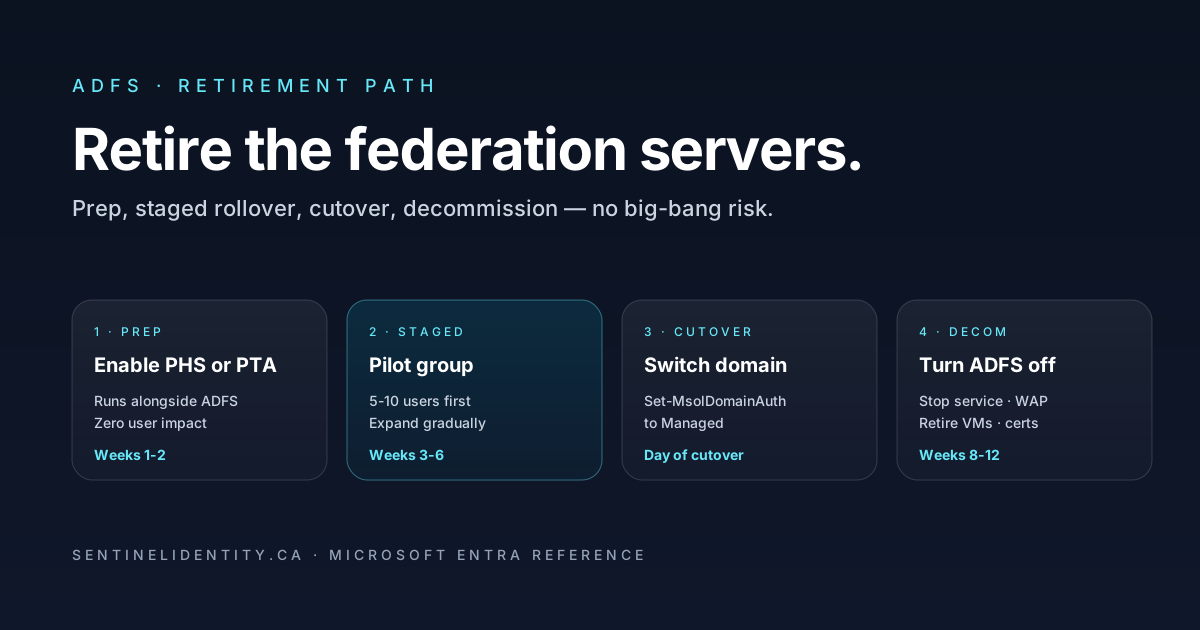
Here's what a real ADFS-to-Entra migration looks like, start to finish. Typical timeline is 4–12 weeks depending on the size of your organization and how many apps other than Microsoft 365 are federated.

Phase 1: Preparation (1–2 weeks)

  • Inventory your federated apps. Microsoft 365 is the big one, but you may also have Salesforce, ServiceNow, custom in-house apps, and others federated with ADFS. Each needs a plan to be re-federated with Entra ID (or moved to cloud SAML/OIDC).
  • Confirm Entra Connect is on a supported version. You need at least Entra Connect 1.1.819 for staged rollover. Most environments are on much newer versions, but confirm.
  • Enable Password Hash Sync (or Pass-Through Auth) in Entra Connect. This can run alongside ADFS with no user impact — it's just prepping the pipeline for later.
  • Turn on Seamless SSO in Entra Connect if you want a smoother user experience. Also non-disruptive.
  • Register the "authentication method policy" for MFA in Entra. Migrating from ADFS-hosted MFA (rare) to Entra-native MFA (recommended).

Phase 2: Staged rollover pilot (2–4 weeks)

Staged rollover is the killer feature. Instead of a big-bang cutover, you move users from federation to cloud auth in groups, one group at a time.

  • Pick a pilot group — 5–10 IT people. Add them to a "Staged Rollover" security group in AD.
  • Enable staged rollover in Entra ID. Point it at that group.
  • Pilot users start authenticating against Entra ID immediately (via PHS or PTA). Their sign-in flow no longer redirects to ADFS.
  • Test everything — Microsoft 365 apps, whatever else those users use. Confirm SSO works, MFA prompts fire correctly, no unexpected behaviour.
  • Iterate. Fix issues, expand the pilot group gradually.

Phase 3: Broader rollout (2–4 weeks)

  • Add more users to the staged rollover group. Typically by department, or by risk tier. Move IT first, then power users, then broader workforce.
  • Monitor sign-in logs. Watch for anyone stuck on federated auth who should have moved. Watch for MFA prompts that didn't fire correctly.
  • Fix broken federated apps one at a time. Each app that was configured to trust your ADFS needs to be updated to trust Entra ID directly. Usually just re-registering the app in Entra as a SAML or OIDC app.

Phase 4: Full cutover (1 day)

  • Convert the whole domain from Federated to Managed. One PowerShell command in Entra Connect:
    Set-MsolDomainAuthentication -DomainName contoso.com -Authentication Managed
  • All remaining users switch to cloud auth at that moment.
  • ADFS is still there and running — it's just no longer being used by Microsoft 365.

Phase 5: Decommission ADFS (2–4 weeks after cutover)

  • Wait 2–4 weeks after full cutover. Monitor for any users or apps that were still relying on ADFS (there's always something you missed).
  • Fix or migrate those stragglers.
  • Once ADFS is confirmed idle: stop the ADFS service, disable the ADFS WAP servers, remove the ADFS server role, retire the VMs.
  • Update your certificate management — cancel any external certificates you were only maintaining for ADFS/WAP.
  • Update runbooks, monitoring dashboards, and DR plans that referenced ADFS.

What breaks in real migrations

Migration horror stories happen. Here are the six issues that come up most often — none are insurmountable if you plan for them.

"Users are getting MFA prompts twice." They probably had per-user MFA enabled in Entra (from legacy days) and MFA policies in ADFS. When you switch to cloud auth, both fire. Fix: disable the legacy per-user MFA, keep only Conditional Access policies.

"A custom in-house app that was federated with ADFS won't authenticate anymore." The app was configured to send SAML tokens to ADFS. You need to reconfigure it to send SAML to Entra ID. The Entra ID SAML endpoint is different — the app's config needs updating with the new endpoint, issuer, and public certificate.

"Some users can't log in after cutover — 'AADSTS50126: invalid username or password.'" Their password hash didn't sync properly. Force a password reset in on-prem AD, wait for Entra Connect to sync (default 30 minutes), then try again. Related: check that Entra Connect's PHS agent is healthy in Entra Connect Health.

"Sign-in logs show federated auth is still being used." Something didn't cut over. Check for users still in the "Staged Rollover" group but not moved to Managed. Also check for users with an Entra domain still set to Federated (Get-MsolDomain | Select DomainName, Authentication).

"ADFS was doing Conditional Access-like things we don't have equivalents for." The good news: Entra Conditional Access is more powerful than ADFS's claims rules. The catch: it works differently. Any complex ADFS claims logic needs to be re-implemented as CA policies, and the mapping isn't 1:1. Build these before cutover.

"WAP proxies are still receiving traffic weeks after migration." External clients or third-party apps might have hard-coded the ADFS/WAP URL. Grep server logs to find them. Update the hard-coded URLs to Entra ID equivalents before you tear down the proxies.

The FAQ

Can I migrate a subset of users to Entra and keep others on ADFS? Yes, that's exactly what staged rollover does. It's the normal path. You can have half your users on cloud auth and half on ADFS for weeks or months during migration.

How long does it take to migrate a large organization? Typical 5,000–20,000 user org: 8–12 weeks. Larger enterprises (50,000+): 6–12 months, mostly because of the number of non-Microsoft federated apps that need re-integration.

What happens to Windows Hello for Business during the migration? Nothing — Windows Hello works with cloud auth as well as it did with federated. No change needed.

Do I need to change anything in on-prem AD? Minimal. Enabling PHS in Entra Connect syncs password hashes; that's a configuration change on the Entra Connect server, not on your DCs.

We're doing an M&A soon. Does that affect the migration timing? It affects it a lot. If you're about to inherit another company's AD and users, doing the ADFS migration first makes the M&A integration much easier — cloud auth handles multi-tenant scenarios far better than federation. If timing forces the M&A first, the ADFS retirement can wait until after integration stabilizes.

Can I use both PHS and PTA at the same time? Yes. Enable both; Entra will use one as primary and the other as fallback. Some large enterprises run this way for maximum resilience.

What if I still have Exchange on-prem federated with ADFS? Exchange on-prem federation for hybrid Exchange scenarios is a separate thing — that's still supported and doesn't need migrating. What we're talking about is Entra ID's federation for user authentication. Two different federations, same name.

Will users notice the migration? Ideally not. Well-planned migrations produce zero user-visible changes — same sign-in URL, same MFA, same everything. Users notice only if something goes wrong. That's why staged rollover matters.

Where to go next

Once your migration is planned (or complete), the natural next topics:

Studying for a cert? The ADFS migration path is heavily featured in SC-300 (Identity and Access Administrator) and MS-102 (Microsoft 365 Administrator). Actually doing a lab migration between two dev tenants is the best possible prep.

Now go grab a coffee. Then, honestly, go look at your ADFS server console. If your CPU is above 40% and your log volume is above 1 GB per day, it's time. Start the pilot next Monday.

About the author

MUA

MU.AMicrosoft 365 / Entra Engineer

MU.A is a hands-on Microsoft 365 and Microsoft Entra engineer. Sentinel Identity is where MU.A writes the long-form troubleshooting and architecture notes that ship articles people can actually use in production tenants.

Feedback

Was this article helpful?

Anonymous — no account or comment required.

Send detailed feedback

Related reading

Conditional Access Authentication Context: Step-Up Auth Without Policy Sprawl

You don't actually want to require phishing-resistant MFA for every sign-in. You want it when the user reaches for a sensitive SharePoint site, activates a PIM role, or runs an action your app considers high-value. Authentication context is the dial that lets you target the step-up at the action instead of the app — and it's underused.