
From the notebook
Replacing a Legacy VPN with Microsoft Entra Private Access: A Practitioner's Rollout Guide
The VPN concentrator is end of life, the renewal quote is unreasonable, and somebody noticed that authenticating fifteen thousand users against a single appliance to reach forty private apps isn't a model anyone would design today. Here's the practitioner's view of replacing it with Entra Private Access, including the deployment order that doesn't strand users.
Every enterprise has the same conversation eventually. The VPN concentrator is end of life. The renewal contract is up. Somebody noticed that the entire user base authenticating against a single appliance to reach forty internal applications isn't a model anyone would design today. The replacement conversation surfaces three real options: renew the existing vendor, deploy a third-party ZTNA platform, or use Microsoft Entra Private Access if you're already deep in the Microsoft ecosystem.
EPA is the path I'll cover here because it has properties that are genuinely hard to get elsewhere. Identity is the unit of access — no IP allowlists, no broad network membership. Conditional Access policies apply per private application instead of just at the SaaS layer. The deployment lives inside your existing Entra admin surface without introducing a new control plane to operate. The trade-off is that EPA is younger than the established ZTNA vendors and the supported-protocol coverage is still expanding. This piece is the operator's guide to deciding when it's the right call, deploying it without locking anyone out, and avoiding the four mistakes I've seen take down rollouts that should have been straightforward.
The Microsoft references throughout are What is Entra Private Access, Configure connectors, Configure Quick Access, and Per-app access.
What EPA does in operator terms
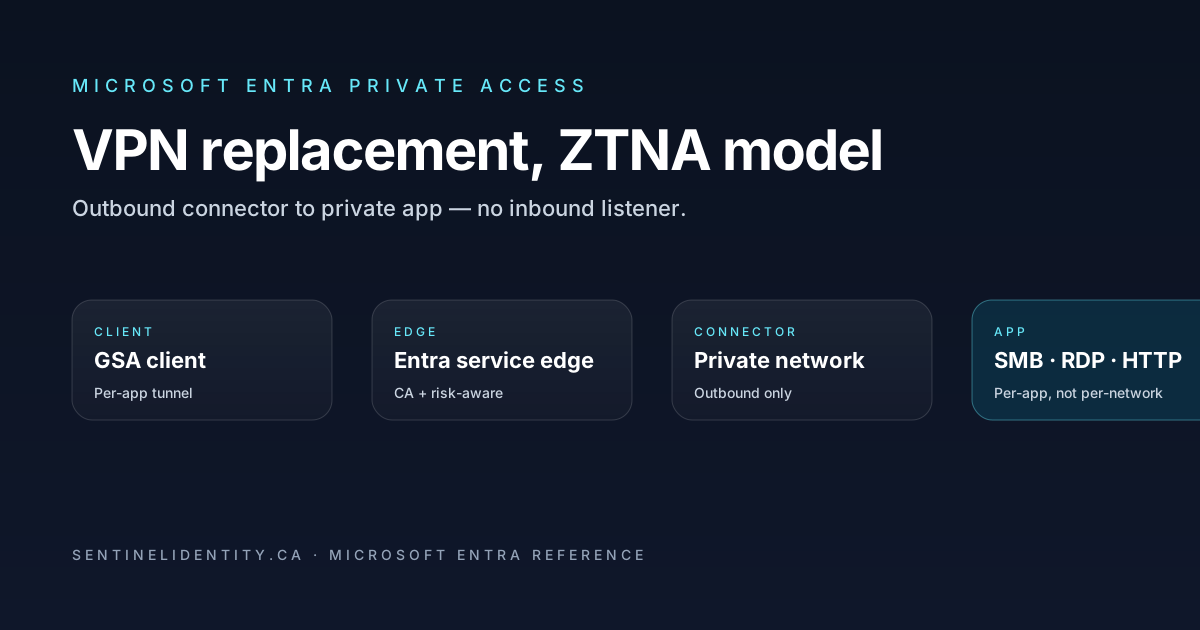
EPA gives users access to private internal applications without putting them on the corporate network. A lightweight connector runs inside your network, makes an outbound connection to the Microsoft service edge, and waits for client requests for a defined set of internal applications. The Global Secure Access client on the user's device routes requests for those applications through the Microsoft edge, the edge authenticates and authorises the request against Conditional Access, and only then does the connector relay the traffic to the internal application. The internal app sees the connector as the client. The user's device never gets put on the corporate IP space.
That's the entire model. No inbound firewall rules to the data centre, no client-side IP allowlists, no full-tunnel routing, no broad network access. Per-application connections, each one identity-evaluated. The security property that makes this fundamentally different from a VPN concentrator is the outbound-only nature of the connector — you don't publish anything to the internet, you just have a process inside your network reaching out.
The three building blocks
EPA has three configurable parts and you get most of the rollout right by getting these right.
Connectors are lightweight Windows Server agents that run inside your private network. Each one authenticates to Entra using a service-side identity issued during connector setup, and maintains a persistent outbound connection to the service edge. Connectors deploy in groups — typically one group per data centre, one per major office, one per Azure region. Group multiple connectors per location for high availability.
Application segments define which internal applications EPA routes. A segment is a logical app entry mapping a name (hr.contoso.internal) or IP range (10.50.0.0/16) plus a port set to a connector group. Users target the app by its friendly name, and the connector in the right group handles the relay. Segments are what Conditional Access binds against — you grant access to a segment, not to a network.
Quick Access is a one-click app entry that covers the broad VPN-style use case. It's effectively a single application segment for "the corporate intranet" defined as a set of subnets or wildcards. Useful for early pilots and for the long tail of one-off apps that don't justify their own segment.
When EPA fits and when it doesn't
EPA is the right call when identity-aware access to a defined set of internal apps is the goal, the protocol mix is HTTP(S), RDP, SSH, and SMB (the well-supported ones), you want Conditional Access policies — device compliance, risk, MFA strength — to apply per app, and you're already on Entra ID P1 or higher with the Entra Suite licensed or Private Access added separately.
It's the wrong call when you need broad layer-3 connectivity (some specialised tools require full IP routing into the corporate network, and that list is small but real), when you have a multi-cloud setup where AWS, GCP, and Azure private apps all need uniform access from non-Entra-managed clients, or when the connector OS requirement is a problem. Connectors today are Windows Server only. There are roadmap items for Linux, verify the current state if Linux connectors are important to you.
Inventory before you touch anything
Before you open the admin portal, build a small spreadsheet with every private application that currently goes over VPN: the DNS names and IPs each uses, the protocol and port set, the criticality (P1, P2, P3) and population that uses each, the current authentication model, and the expected client OS mix per app.
This inventory is the input to your application segments. You'll thank yourself when the rollout starts producing tickets and you can map "user X can't reach app Y" to "app Y is in connector group Z, which lives in data centre W" in thirty seconds. The inventory is also where you discover apps that nobody currently uses, which is a useful forcing function for retiring them rather than carrying them forward into the new world.
A rollout sequence that doesn't strand users
The mistake that produces the worst rollouts is cutting users over to EPA while the VPN concentrator is still active and accepting connections. Users hit a problem with EPA, fall back to VPN, you can't tell which population is actually on EPA, and the migration drags out for a year. The order below avoids that.
Phase one: connector deployment and pilot apps. Deploy two connectors in your primary data centre. Always two — single-connector deployments break during patching, and "patching took a critical app offline at 2am" is the story you don't want to be telling. After install, the connector registers itself with Entra. Confirm in the admin centre that the new connector shows as Active. Define one application segment pointing at a low-risk internal app — typically an internal status page or test web app that doesn't take you down if it's misconfigured. Test access for a single pilot user with the GSA client installed:
EnrichedMicrosoft365AuditLogs
| where TimeGenerated > ago(1h)
| where Workload == "MicrosoftGlobalSecureAccess"
| where Category == "PrivateAccess"
| project TimeGenerated, UserPrincipalName, AppDisplayName, Action,
          tostring(ApplicationDetails)
| order by TimeGenerated desc
Phase two: pilot expansion. Add the next five to ten application segments. Pilot twenty-five to fifty users. Both the GSA client and the existing VPN client stay installed on pilot user machines — you want them to be able to fall back to VPN if EPA has a gap. Watch the EPA traffic logs daily. Anything unexpected (traffic to an internal IP that no segment covers, an app you didn't anticipate) is data you need before scaling.
Phase three: Conditional Access integration. Now create CA policies targeted at the application segments. The first policy is usually something like "Require MFA for access to all private apps" or "Require compliant device for high-sensitivity private apps." Run these in report-only for at least seven days. Watch sign-in logs for unexpected failures. The Conditional Access tab on a sign-in record tells you which application segment was being targeted.
Phase four: VPN deprecation per population. Cut populations off the VPN by group. Start with IT — you wrote the migration, eat your own dog food. Then power users, then department by department. Each cohort: move them from VPN-allowed to VPN-blocked at the concentrator, ensure they have the GSA client deployed and connected, communicate the change with one specific contact channel for "what isn't working," hold for one to two weeks before the next cohort.
Telemetry for the rollout
A small KQL toolkit keeps the rollout honest. Top apps by usage:
EnrichedMicrosoft365AuditLogs
| where TimeGenerated > ago(7d)
| where Workload == "MicrosoftGlobalSecureAccess"
| where Category == "PrivateAccess"
| where Action == "Allowed"
| summarize Sessions = count() by ApplicationName = tostring(ApplicationDetails.name)
| order by Sessions desc
Failures by reason — the daily review:
EnrichedMicrosoft365AuditLogs
| where TimeGenerated > ago(24h)
| where Workload == "MicrosoftGlobalSecureAccess"
| where Action != "Allowed"
| summarize Failures = count() by Action, Reason = tostring(Reason)
| order by Failures desc
Connector health, sessions per connector:
EnrichedMicrosoft365AuditLogs
| where TimeGenerated > ago(7d)
| where Workload == "MicrosoftGlobalSecureAccess"
| extend Connector = tostring(ConnectorDetails.name)
| summarize Sessions = count() by Connector
| order by Sessions desc
The third query is the one that catches imbalance. If ninety percent of sessions are hitting one connector in a two-connector group, the other is unhealthy or unreachable on the internal network even though Entra reports it as Active. That's the kind of thing you want to find on a Tuesday afternoon, not during a Saturday outage.
The four mistakes to avoid
After enough rollouts the same four mistakes account for most of the regret.
The first is one connector per group. Always two minimum. Patching, hardware failure, or a Windows Update reboot takes a single connector offline, and a single-connector group breaks the application during that window. Three connectors is appropriate for high-traffic data centres.
The second is overly broad application segments. It's tempting to define an application segment as 10.0.0.0/8 "to cover everything." That works on day one and then makes it impossible to apply per-app Conditional Access later. Define segments at the level you intend to govern — usually per-application or per-cluster.
The third is forgetting DNS. The GSA client on the user's device needs to resolve internal DNS names to the right virtual IPs that get routed through EPA. The connector then re-resolves against internal DNS. If your DNS suffix list isn't right, the client doesn't know which traffic to route through EPA at all. The fix is either pushing the right DNS suffix configuration to clients (Intune or Group Policy) or using the Private DNS feature in EPA to publish suffixes globally.
The fourth is treating VPN deprecation as a single date. A single-date cutover where the VPN concentrator goes offline and EPA is "production starting Monday" is the rollout pattern that produces the worst week of help-desk volume in a year. Stage it.
Things I get asked
Does EPA need a specific license? Yes. Private Access is part of the Microsoft Entra Suite or licensed standalone. Entra ID P1 or P2 alone isn't sufficient. Verify on the Entra plans page for current SKU mapping.
Can the GSA client coexist with our existing VPN? In most pilots, yes. The GSA client routes only traffic matching its forwarding profile and configured application segments. Other traffic falls through to the host's normal routing, which the VPN client uses. Some VPN clients with aggressive full-tunnel configurations need ordering tweaks — test in pilot before assuming.
What protocols does EPA actually support? HTTP/HTTPS, RDP, SSH, and SMB are the well-supported scenarios. UDP-based protocols and some legacy thick-client protocols have variable support. Verify against the supported protocols documentation before committing a specific application to EPA.
How does EPA handle Kerberos auth against AD-integrated apps? It passes the SMB, HTTP, or RDP session through transparently. The user's Windows token continues to authenticate against the internal app the same way it would over a VPN. The connector doesn't impersonate or modify the Kerberos exchange.
What if all connectors in a group are offline? The application segment becomes unreachable through EPA. The GSA client reports a connection failure for that app. If you have a CA policy requiring access through EPA, users can't reach the app at all. Design connector HA accordingly.
Can we use EPA from unmanaged personal devices? Only with the GSA client installed, which is the friction point on personal devices. For the personal-device scenario, most teams use a different pattern — browser-based remote access via Entra Application Proxy for the specific apps that warrant it.
Where to read further
- What is Microsoft Entra Private Access — Microsoft Learn
- Configure connectors for Global Secure Access — Microsoft Learn
- Quickstart: Configure Quick Access — Microsoft Learn
- Per-app access in Private Access — Microsoft Learn
- Global Secure Access traffic dashboard — Microsoft Learn
- Microsoft Entra plans and pricing
About the author
MU.AMicrosoft 365 / Entra Engineer
MU.A is the editorial byline for Sentinel Identity, covering Microsoft Entra, Microsoft 365, and identity administration. Send corrections or questions through the contact page.
Feedback
Was this article helpful?
Anonymous — no account or comment required.
Related reading
Azure RBAC Access Packages in Microsoft Entra: Admin Guide
Govern Azure RBAC access with Microsoft Entra access packages: scope roles safely, choose active or eligible access, pilot approvals, and verify removal.
Manage Microsoft Entra Recommendations with Microsoft Graph
Manage Microsoft Entra recommendations with Graph beta: inventory resources, add workflow tags, choose accurate states, and preserve review evidence.
Prevent Nested Groups in Microsoft Entra: Admin Guide
Prevent nested groups in Microsoft Entra with the new disableNesting preview control. Inventory dependencies, pilot safely, monitor changes, and roll back.